Email Section
This is an example of a common impersonation scam, where the sender pretends to be a legitimate company in order to trick you into clicking on a link and providing personal information. Click on the buttons to find the common indicators of a fraudulent email, and the best way to respond.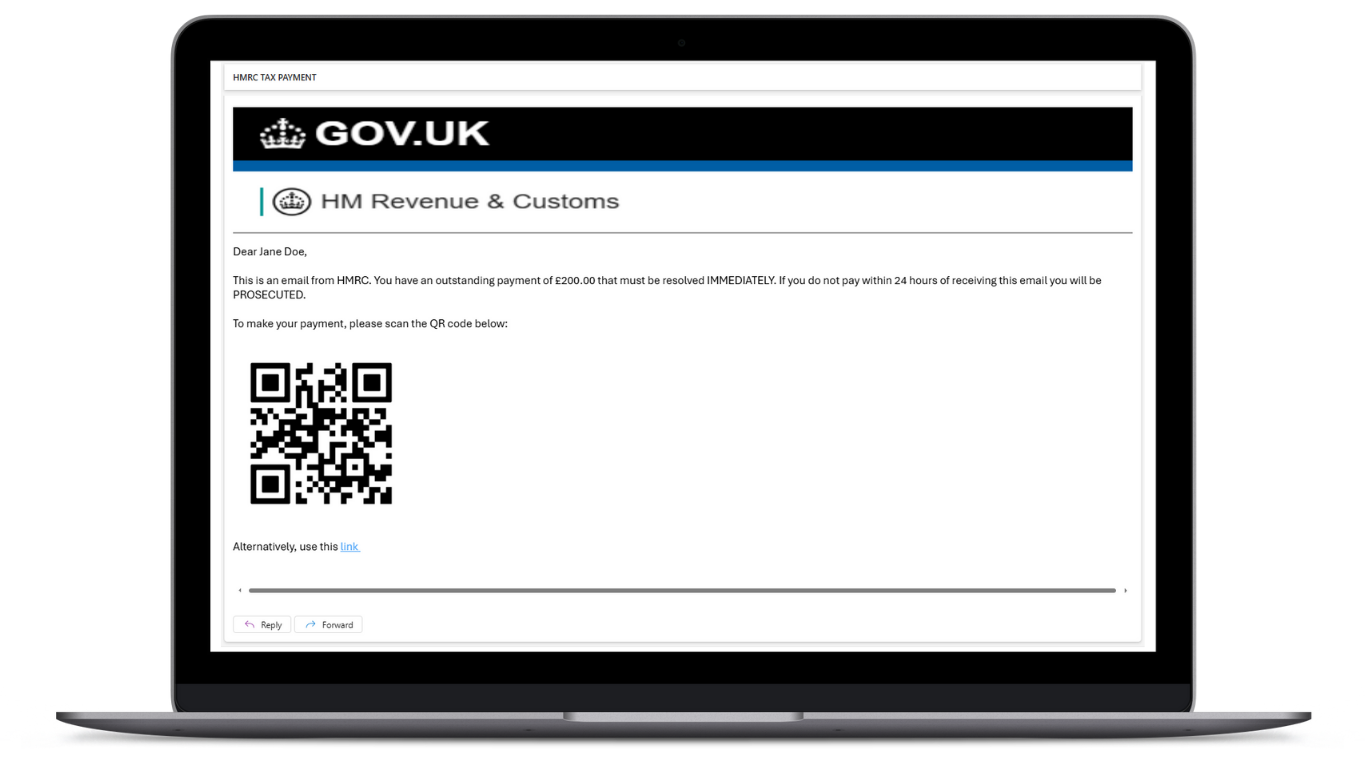
Suspicious images
In this example, the sender uses a header image that is slightly stretched out and blurry. This is a common sign of a fraudulent email, as legitimate companies will use high-quality images that are properly sized. If the imagery in an email looks off, it could be a sign that the email is not legitimate. Click here to close
In this example, the sender uses a header image that is slightly stretched out and blurry. This is a common sign of a fraudulent email, as legitimate companies will use high-quality images that are properly sized. If the imagery in an email looks off, it could be a sign that the email is not legitimate. Click here to close
Language
In this email, the sender uses urgent and threatening language, including capitalised words. This is a common tactic used to create a sense of urgency and pressure the recipient into taking action. Legitimate companies will not use this type of language in their emails. Click here to close
In this email, the sender uses urgent and threatening language, including capitalised words. This is a common tactic used to create a sense of urgency and pressure the recipient into taking action. Legitimate companies will not use this type of language in their emails. Click here to close
QR Codes
In this email, the sender includes a QR code to the website that they want you to visit. This is a common way that fraudsters trick you into visitng harmful sites, as it is disguised in a way that you cannot inspect the website's address and see if it appears legitimate. Normally, a company would not include a QR code in an email. If you are sent a QR code, it is best practice to independently search for the website in your browser, so that you know the site you are visiting is legitimate. Click here to close
In this email, the sender includes a QR code to the website that they want you to visit. This is a common way that fraudsters trick you into visitng harmful sites, as it is disguised in a way that you cannot inspect the website's address and see if it appears legitimate. Normally, a company would not include a QR code in an email. If you are sent a QR code, it is best practice to independently search for the website in your browser, so that you know the site you are visiting is legitimate. Click here to close
The Link
As an alterantive to the QR code, the sender has included a link to the website that they want you to visit. This link is called an embedded link, meaning that the text of the link does not match the actual website address. This is a common tactic used by fraudsters to trick you into clicking on a link that takes you to a harmful site. You can view the actual website address by hovering over the link with your mouse. If the link does not match the company that is sending you the email, it is likely a fraudulent email. If you are unsure, it is best practice to independently search for the website in your browser, so that you know the site you are visiting is legitimate. Click here to close
As an alterantive to the QR code, the sender has included a link to the website that they want you to visit. This link is called an embedded link, meaning that the text of the link does not match the actual website address. This is a common tactic used by fraudsters to trick you into clicking on a link that takes you to a harmful site. You can view the actual website address by hovering over the link with your mouse. If the link does not match the company that is sending you the email, it is likely a fraudulent email. If you are unsure, it is best practice to independently search for the website in your browser, so that you know the site you are visiting is legitimate. Click here to close
How to respond
If you receive an email that you suspect is fraudulent, it is best to not respond to the email or click on any links. Instead, you should independently search for the company's website and contact them directly to verify the email.
It is also important to report the email, to prevent the sender from contacting you or others in the future. You can do this by forwarding the email to report@phishing.gov.uk
To find out more about how to report fraudulent emails, click here Click here to close
If you receive an email that you suspect is fraudulent, it is best to not respond to the email or click on any links. Instead, you should independently search for the company's website and contact them directly to verify the email.
It is also important to report the email, to prevent the sender from contacting you or others in the future. You can do this by forwarding the email to report@phishing.gov.uk
To find out more about how to report fraudulent emails, click here Click here to close