Text Section
This is an example of a common impersonation scam, where the sender pretends to be a legitimate company in order to trick you into clicking on a link and providing personal information. Click on the buttons to find the common indicators of a fraudulent message, and the best way to respond.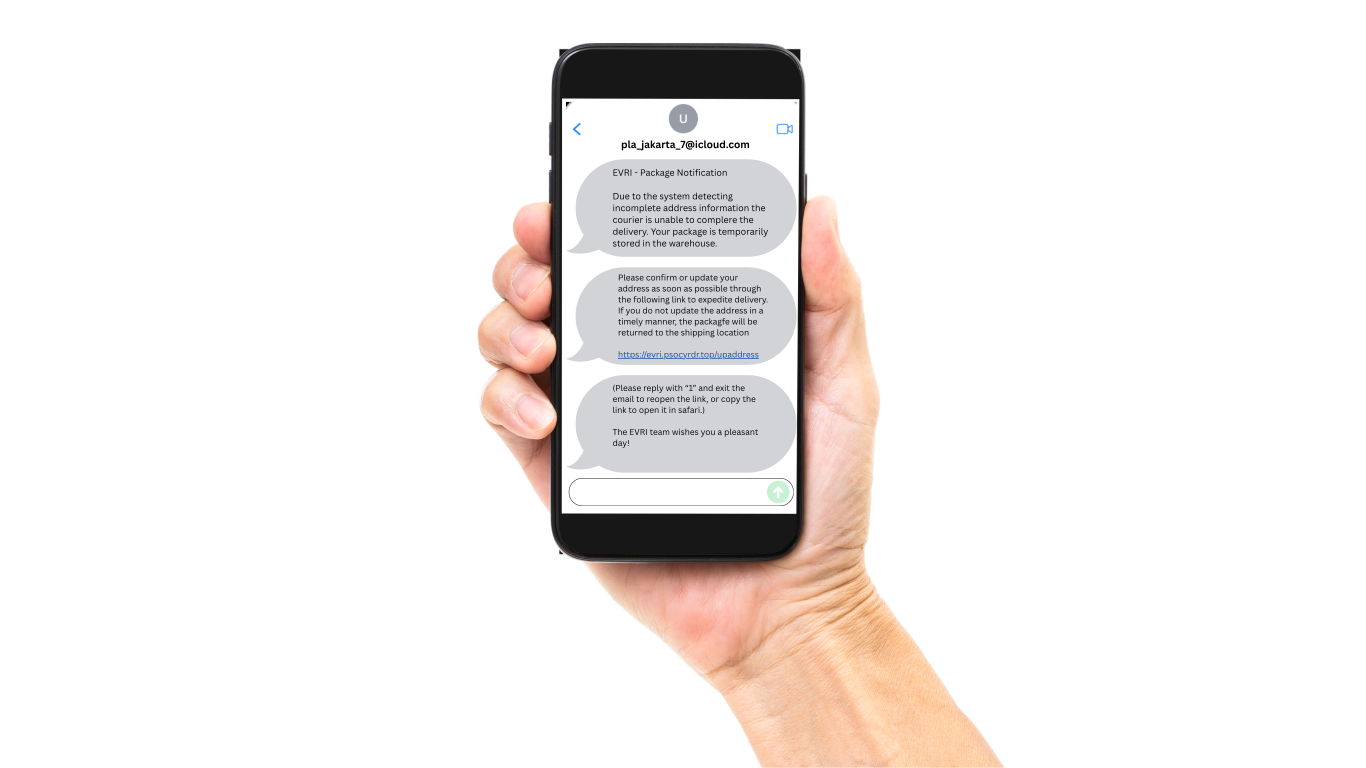
Who sent this?
This is an example of an Imessage, which is a type of text message only received on Apple devices. You do not need a phone number to send an Imessage, only an Icloud account. This is why a the sender of this message does not have a phone number, and an email address is displayed instead.
In a legitimate scenario, when a company account sends a message to your phone (wether it be a text message or an Imessage), the sender name will be displayed as the company name, and not a phone number or email address. In this example, the sender should be "EVRI" rather than "pla_jakarta_7@icloud.com". Additionally, the sender's email address has an unconventional layout, and does not even include the name of the company that it is pretending to be. Click here to close
This is an example of an Imessage, which is a type of text message only received on Apple devices. You do not need a phone number to send an Imessage, only an Icloud account. This is why a the sender of this message does not have a phone number, and an email address is displayed instead.
In a legitimate scenario, when a company account sends a message to your phone (wether it be a text message or an Imessage), the sender name will be displayed as the company name, and not a phone number or email address. In this example, the sender should be "EVRI" rather than "pla_jakarta_7@icloud.com". Additionally, the sender's email address has an unconventional layout, and does not even include the name of the company that it is pretending to be. Click here to close
Grammar
If you look closely at the text, you will see that there are a few grammar mistakes. For example, there is a spelling mistake where 'package' has been spelt as 'packagfe'. This is a common mistake made by scammers, that would not likely be made by a legitimate company. Click here to close
If you look closely at the text, you will see that there are a few grammar mistakes. For example, there is a spelling mistake where 'package' has been spelt as 'packagfe'. This is a common mistake made by scammers, that would not likely be made by a legitimate company. Click here to close
The link
In alot of scam messages, the sender will try to get you to click on a link to a website. The link will be constructed to appear legitimate, but there may be indicators that it is not. In this example, the link uses the address 'https://evri.psocyrdr.top' which does not follow the normal format of a legitimate link such as 'https://evri.com'.
If you are sent a link that you are unsure about, try searching for what you need on the official website, which you should access independently of the link you have been sent, using a web browser such as Google. You can also try contacting the company directly. Click here to close
In alot of scam messages, the sender will try to get you to click on a link to a website. The link will be constructed to appear legitimate, but there may be indicators that it is not. In this example, the link uses the address 'https://evri.psocyrdr.top' which does not follow the normal format of a legitimate link such as 'https://evri.com'.
If you are sent a link that you are unsure about, try searching for what you need on the official website, which you should access independently of the link you have been sent, using a web browser such as Google. You can also try contacting the company directly. Click here to close
Why have I received this message?
When you receive an unexpected message, it is important to stop and think about why it was sent to you. You should ask yourself questions such as: "Do I have an account with this company?" and "Have I ordered anything from this company recently?". If the answer to these questions is no, then it is likely that the message is a scam.
It is also important to remember that phone numbers are publicly available, and scammers can get hold of your number very easily - bu this is not your fault. It is impossible to avoid receiving scam messages Click here to close
When you receive an unexpected message, it is important to stop and think about why it was sent to you. You should ask yourself questions such as: "Do I have an account with this company?" and "Have I ordered anything from this company recently?". If the answer to these questions is no, then it is likely that the message is a scam.
It is also important to remember that phone numbers are publicly available, and scammers can get hold of your number very easily - bu this is not your fault. It is impossible to avoid receiving scam messages Click here to close
Does this make sense?
When you receive a message, it is important to stop and think about what it is saying, and if it makes sense.
For example, in this message, the sender is asking you to exit an email, and then click on a link to track your package. This does not make sense, as you should not need to exit and re-enter an email to use a tracking link. Additionally, this is a text message, and there is no email involved. In a legitimate scenario, the company would not make a mistake such as this, and would be clear and concise. Click here to close
When you receive a message, it is important to stop and think about what it is saying, and if it makes sense.
For example, in this message, the sender is asking you to exit an email, and then click on a link to track your package. This does not make sense, as you should not need to exit and re-enter an email to use a tracking link. Additionally, this is a text message, and there is no email involved. In a legitimate scenario, the company would not make a mistake such as this, and would be clear and concise. Click here to close
What is the correct response?
When you receive a message that you believe is fraudulent, it is important to not respond to the message, or click on any links. If there is a chance that the company is trying to contact you, you should try to contact them directly using a method that you know is legitimate, such as their official website or a phone number that you know is correct.
It is also important to report the message, to avoid the sender from contacting you again, or potentially scamming someone else. You can do this by forwarding the message to 7726, which is a free service that will report the message to your network provider.
To find out more on how to report a fraudulent message, click here Click here to close
When you receive a message that you believe is fraudulent, it is important to not respond to the message, or click on any links. If there is a chance that the company is trying to contact you, you should try to contact them directly using a method that you know is legitimate, such as their official website or a phone number that you know is correct.
It is also important to report the message, to avoid the sender from contacting you again, or potentially scamming someone else. You can do this by forwarding the message to 7726, which is a free service that will report the message to your network provider.
To find out more on how to report a fraudulent message, click here Click here to close